This site is built with Hugo and the Kopi theme. The goal was simple: writing a blog post should be as easy as writing in a text editor — no admin panel, no database.
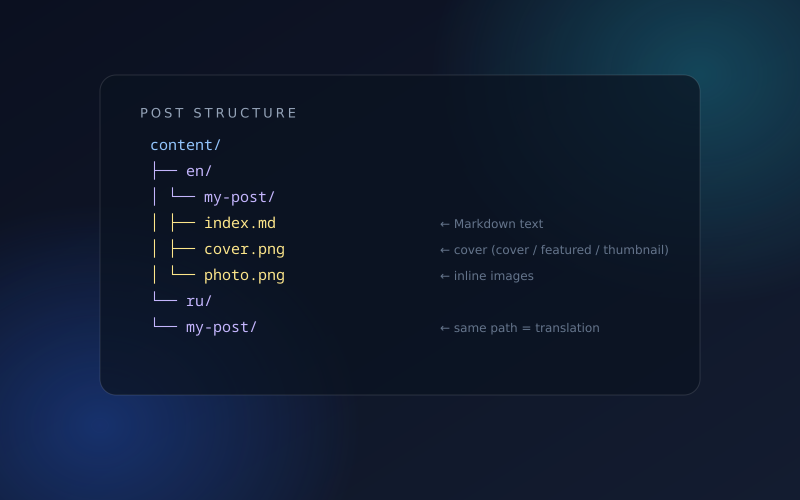
Adding a post
From the project root:
make new SLUG=my-post TITLE_EN="My post" TITLE_RU="Моя запись"The command creates content/en/my-post/index.md and content/ru/my-post/index.md as drafts. Then:
- Write the text in both
index.mdfiles (or delete the language you don’t need). - Put images in the same folder.
- Name the cover
cover.png(featured.jpgandthumbnail.webpalso work). - Change
draft: truetodraft: falsewhen the post is ready.
Preview locally, drafts included:
hugo server -DBuild the production site:
hugo --gc --minifyImages
An inline image is plain Markdown. The title in quotes becomes the caption:
The theme converts images to responsive WebP and adds a lightbox for zooming. A file named cover.* or featured.* in the post folder is used on post cards and in social previews.
Two languages
English lives at the site root, Russian under /ru/. Translations are paired by path: content/en/my-post/ and content/ru/my-post/. The language switch is in the header.
What the theme gives you
- instant page transitions with Turbo;
- full-text search limited to the current language;
- a reading list at
/library/that is stored in your browser; - tag pages and filters;
- light and dark themes that follow your system settings.
That’s it. Keep it simple.